B2B lookalike with AI
BetaPremium module

ICP cloning: more customers like your best ones.

Start with the customers who already buy from you. Unique calculates the common profile of your portfolio, suggests three ICPs and counts how many lookalike companies exist outside your base. Your current customers are left out.

3Suggested ICPs
3ways to send your portfolio
2modes: + Precision and + Volume
How it works

From portfolio to lookalike market in three steps.

In the Cloning › ICP (beta) menu there are three steps: Portfolio, Your ICP and Lookalike market. You can move back and forth without losing anything.

ICP Cloning

From CNPJ to mailing list

  1. 1
    PortfolioPaste the CNPJs (one per line, or separated by commas or semicolons), upload a CSV or pick a list from My Customers, up to 5,000 CNPJs per upload. Then choose the mode and scope and click “Find my ICP”.
  2. 2
    Your ICPUnique compares your portfolio with every active company and returns three suggestions: Conservative, Balanced and Broad. One is marked as recommended.
  3. 3
    Lookalike marketSee how many lookalike companies exist, already without your customers, by size, estimated revenue, employees, state and tax regime.
  4. 4
    Use the ICPName the search profile and click “Save and see leads” or “Generate mailing list”. The profile is stored in My Profiles.
Recommended: at least 5 customers. Ideal: 20 or more.PORTFOLIO
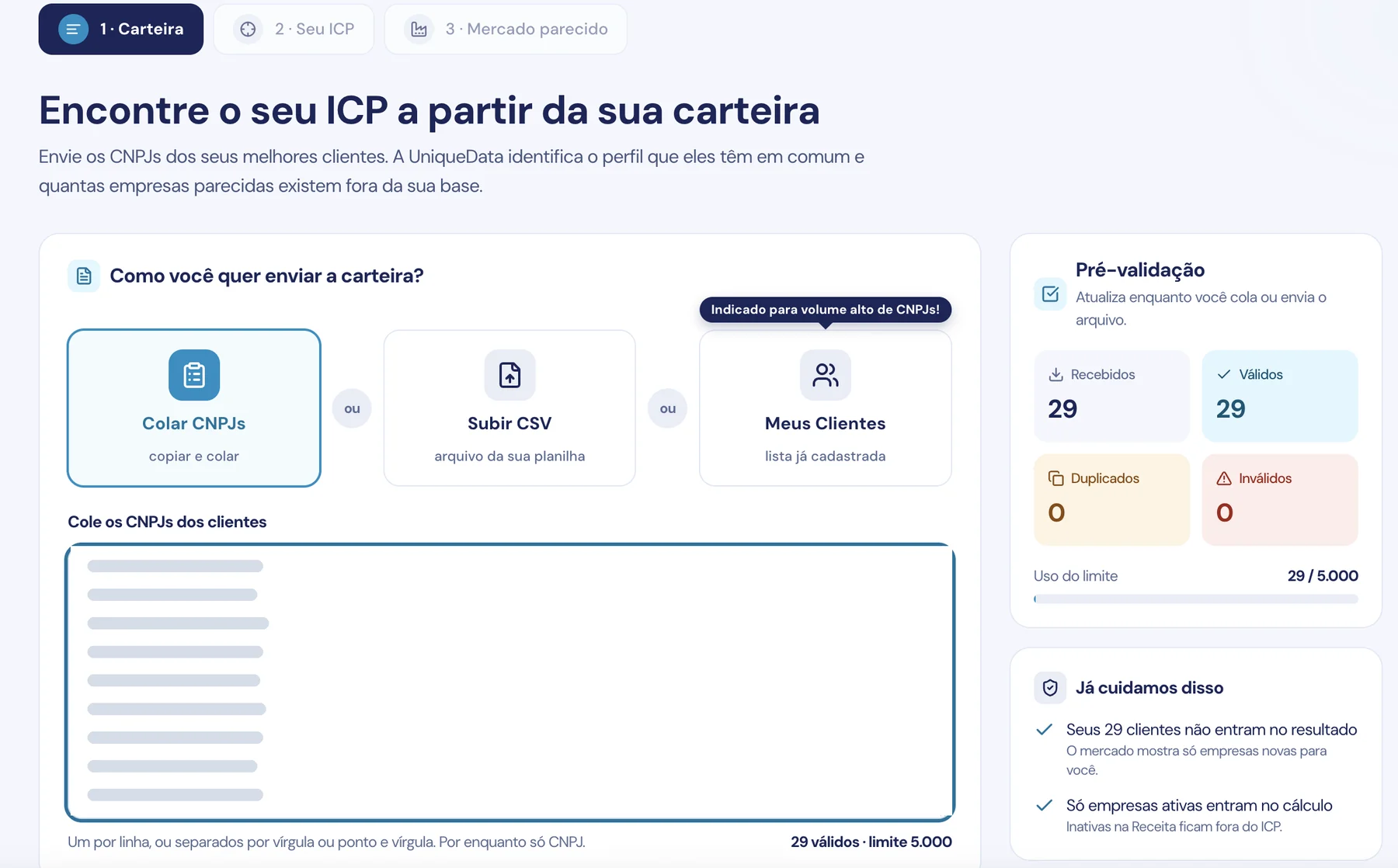
Step 1 · Portfolio

Your portfolio arrives checked.

Choose how to send it: Paste CNPJs, Upload CSV or My Customers, the option recommended for a high volume of CNPJs. The pre-validation panel updates while you paste or upload the file.

  • Instant pre-validation

    Received, valid, duplicate and invalid entries are counted before you continue.

  • Up to 5,000 CNPJs per upload

    “Limit usage” shows how much of the portfolio is already in. In the example, 29 of 5,000.

  • Your customers don't enter the result

    The market only shows companies that are new to you. No paying for leads you already have.

  • Only active companies enter the calculation

    Companies inactive at the Federal Revenue are left out of the ICP.

Portfolio step of ICP Cloning on Unique: Paste CNPJs, Upload CSV and My Customers options, hidden CNPJ list, pre-validation with 29 received, 29 valid, 0 duplicates and 0 invalid, limit usage at 29 of 5,000 and the notice that customers are left out of the result and only active companies enter the calculation
Step 1 · Portfolio: 29 CNPJs pasted, all valid, and limit usage at 29 of 5,000.
Still in the Portfolio step

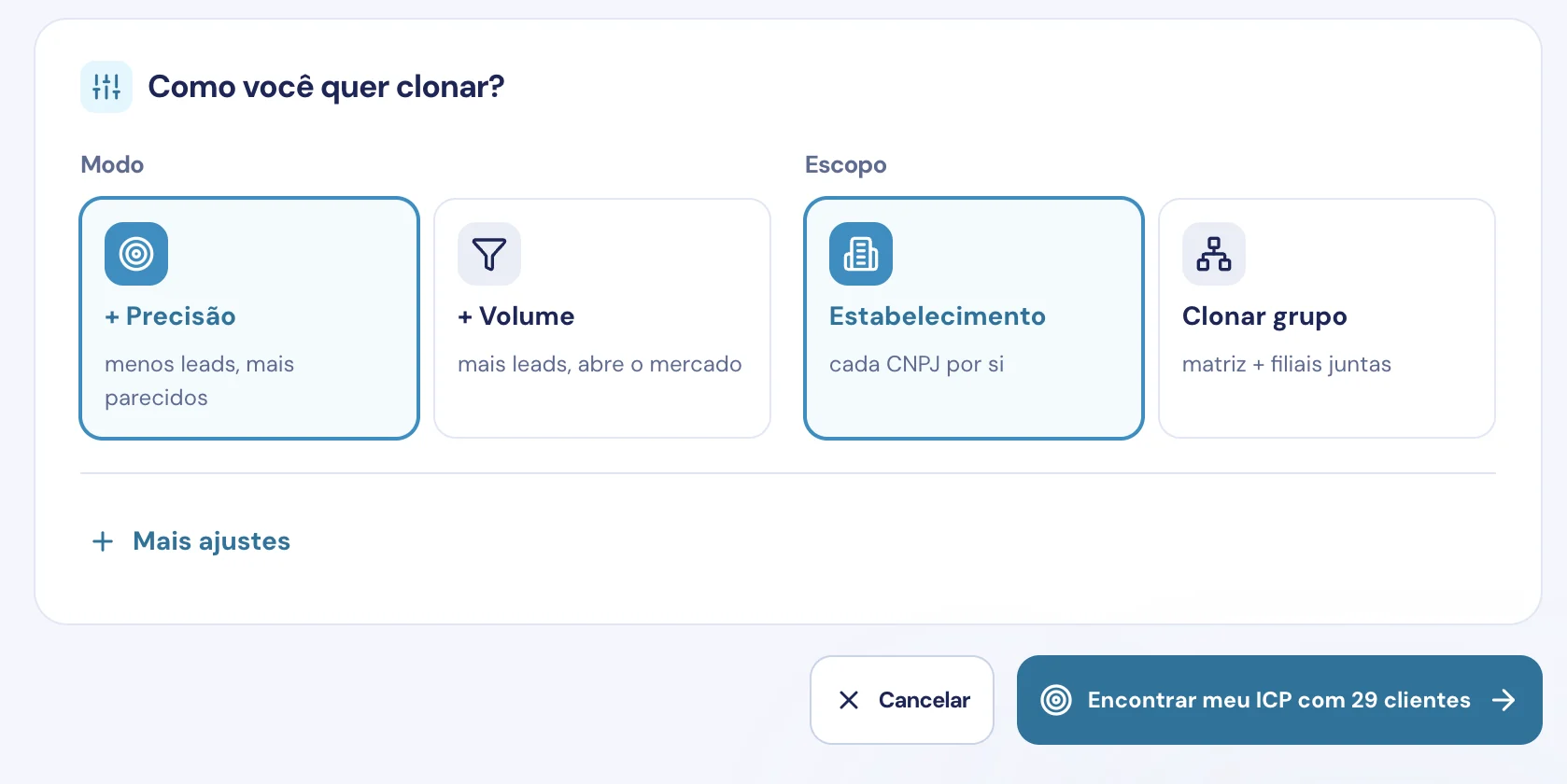
How do you want to clone? Mode and scope.

Before running the analysis, tell us what kind of market you want. The button confirms how many customers are included: “Find my ICP with 29 customers”, in the example.

  • Mode: + Precision or + Volume

    + Precision brings fewer, more similar leads. + Volume brings more leads and opens up the market.

  • Scope: Establishment or Clone group

    In Establishment, each CNPJ counts on its own. In Clone group, headquarters and branches are analyzed together.

  • More settings

    Opens extra options, such as “Prioritize companies that are hiring”.

Unique's How do you want to clone? screen: + Precision mode (fewer, more similar leads) selected next to + Volume (more leads, opens the market), Establishment scope (each CNPJ on its own) selected next to Clone group (headquarters + branches together), the More settings link and the Find my ICP with 29 customers button
Mode, scope and More settings, before finding the ICP.
What you get

Three ICPs, each with its own market.

In the Your ICP step, each suggestion shows coverage (how many of your customers have that profile) and the size of the lookalike market.

  • Specificity

    Very specific, Specific or Broad. Shows whether the ICP is a high-affinity niche or a larger audience.

  • Customers left out of the result

    Your existing customers don't enter the market. You don't pay for leads you already have.

  • “× the base”

    Compares the weight of each attribute in your portfolio with its weight across all active companies. The higher it is, the more it sets your customers apart.

  • Fine-tuning

    Check and uncheck ranges and the market is recounted. Don't like it? Use “Undo changes”.

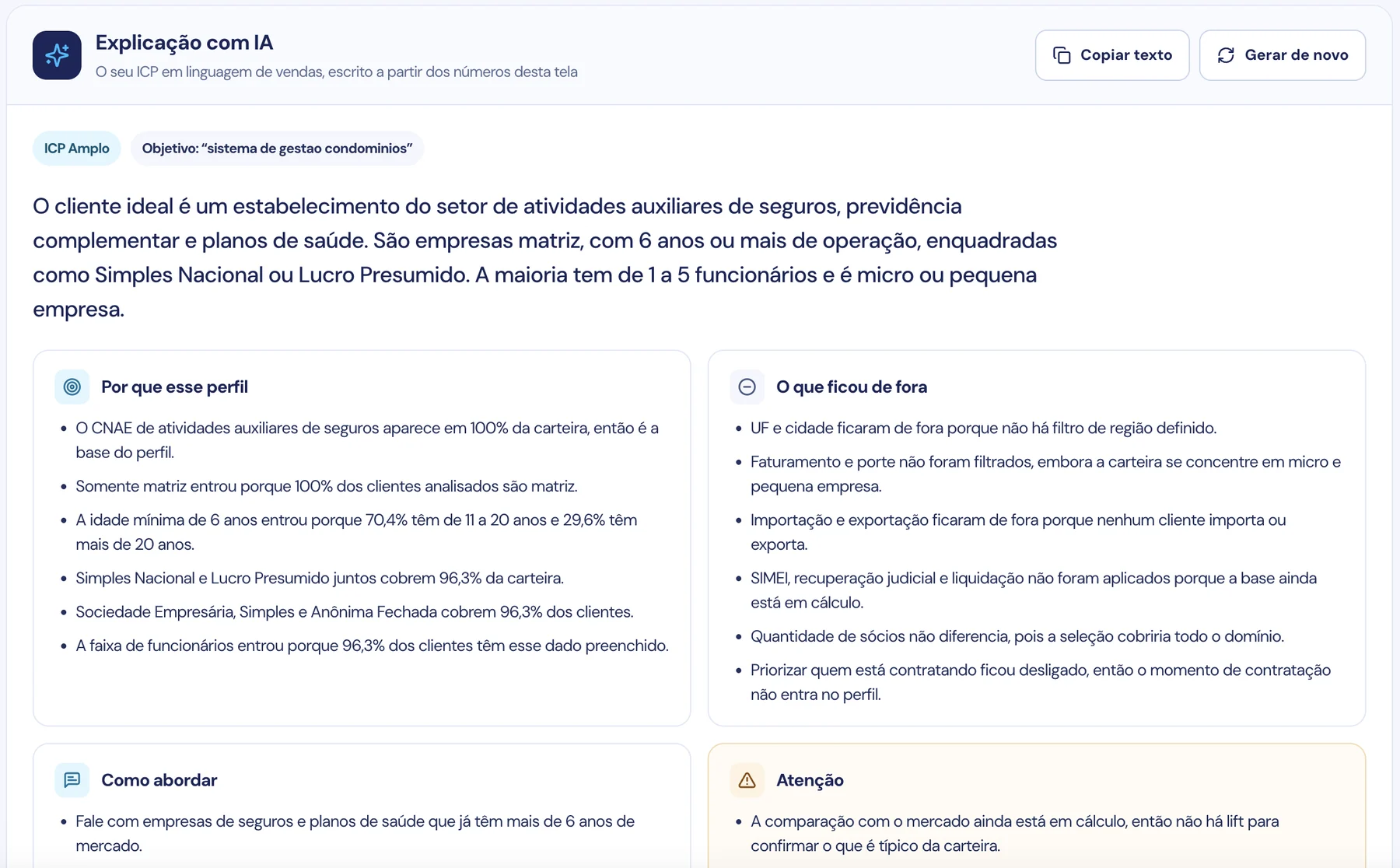
AI explanation: the ICP in sales language.

In “What do you want to sell to this audience?”, say what you sell (optional) and click Explain. The AI reads the suggestion's numbers and writes the text. You can copy it or generate it again.

AI explanation of a Broad ICP on Unique, with the goal condominium management system: ideal customer summary in sales language and the blocks Why this profile, What was left out, How to approach and Watch out, with the Copy text and Generate again buttons
AI explanation of a Broad ICP: the ideal customer summary and the four blocks, written from the numbers on screen.
Why this profile

What your customers have in common, with the portfolio's numbers.

What was left out

The ranges and attributes that didn't make it into the ICP, and why.

How to approachFor the SDR

A suggestion on how to talk to the lookalike companies, ready for the first contact.

Watch out

Things to check before exporting the market.

How to approach

The ICP comes with a suggested approach.

Knowing who the ideal customer is is half the job. The other half is knowing how to talk to them. In the How to approach block, the AI turns the ICP's numbers into sales guidance so the SDR can start prospecting.

  • From numbers to conversation

    Instead of interpreting CNAE codes, ranges and percentages, the SDR reads who to talk to, in sales language.

  • Takes into account what you sell

    Enter your goal before explaining and the AI uses it to suggest the approach.

  • Ready for the team

    “Copy text” takes the explanation to your playbook, CRM or cadence briefing. “Generate again” brings another version.

How to approachAI explanation · Broad ICP
“Talk to insurance and health plan companies that have been in the market for over 6 years.”
Excerpt from the How to approach block in the screen above. The explanation is written for the ICP you choose.
Use cases

A B2B ICP for every goal.

The same customers generate different markets. Choose the mode and scope based on what your team needs now.

Few accounts, very similar

Use the portfolio of your top-buying customers in + Precision mode. Fewer leads, more affinity.

+ Precision

A full calendar for the SDR

+ Volume mode opens up the market without straying from the profile. Good for those who need a big list.

+ Volume

Customers with headquarters and branches

Clone group analyzes headquarters and branches together and shows how many business groups exist.

Clone group

Who's growing right now

Turn on “Prioritize companies that are hiring”: only companies with moderate or high hiring are included.

More settings
Lookalike market

See the market before exporting.

The Lookalike market step shows how many companies similar to your customers exist, all active and already without your portfolio. You only pay when you open or export the leads.

  • Portfolio vs. market

    Estimated revenue and employees by range, side by side with your portfolio. Does the market look like your customers?

  • Composition

    Size, tax regime, founding year, Simples Nacional and headquarters.

  • Where the market is

    One square per state, in the approximate position on the map of Brazil.

Attributes the analysis evaluates in your portfolio

  • Main activity (CNAE)
  • States
  • Estimated revenue
  • Employees
  • Group employees
  • Size
  • Headquarters or branch
  • Company age
  • Tax regime
  • Legal nature
  • City
  • Number of partners
  • Imports
  • Exports
  • No MEI
  • No judicial recovery
  • No extrajudicial liquidation
  • Hiring now
FAQ

Questions about ICP cloning.

What is ICP cloning?

It's finding companies similar to your best customers. You send your portfolio's CNPJs, Unique calculates the profile they have in common and counts how many active companies with that profile exist outside your base. It's lookalike applied to B2B.

How many customers do I need to send?

We recommend at least 5 customers, and ideally 20 or more. With fewer than 5, the profile copies everything about them and the lookalike market may come out empty.

How many CNPJs can I send at once?

Up to 5,000 CNPJs per upload. Pre-validation shows received, valid, duplicate and invalid entries and limit usage while you paste or upload the file. For a high volume of CNPJs, the screen recommends the My Customers option.

What's the difference between + Precision and + Volume?

+ Precision brings fewer leads, more similar to your portfolio. + Volume brings more leads and opens up the market. The market preview shows an estimate in both modes before you analyze.

What changes between Establishment and Clone group?

In Establishment, each CNPJ counts on its own. In Clone group, headquarters and branches are analyzed together, and the lookalike market also shows how many business groups exist.

Do my current customers appear in the result?

No. Your customers are left out of the lookalike market, which only shows companies that are new to you. That way you don't pay for leads you already have. Companies inactive at the Federal Revenue are also left out of the ICP calculation.

What does the AI explanation show?

It writes the ICP in sales language from the numbers on screen: why this profile, what was left out, how to approach and points of attention. The How to approach block already suggests how to talk to the lookalike companies and, if you say what you sell, the AI uses it in the suggestion. You can copy the text or generate it again.

Is ICP cloning included in every plan?

No. ICP Cloning is a premium module and is in beta. Without the module, the screen appears locked. Talk to the sales team to enable it on your license.

From your best customer to the next one

At Unique you talk to the person who signs the contract!

Book a demo and bring your portfolio. We'll show the common profile of your customers and the size of the lookalike market.

Talk to a specialist